When ChromeOS first launched, the concept of an operating system built entirely around a web browser seemed unconventional. Most computers ran heavy desktop software, and using a lightweight OS felt like underutilizing hardware.
Today, web applications handle everything from email and document creation to image editing and remote desktop access. Because most daily computer tasks occur inside a browser, an OS designed around web architecture makes total sense.
1. What Is ChromeOS?
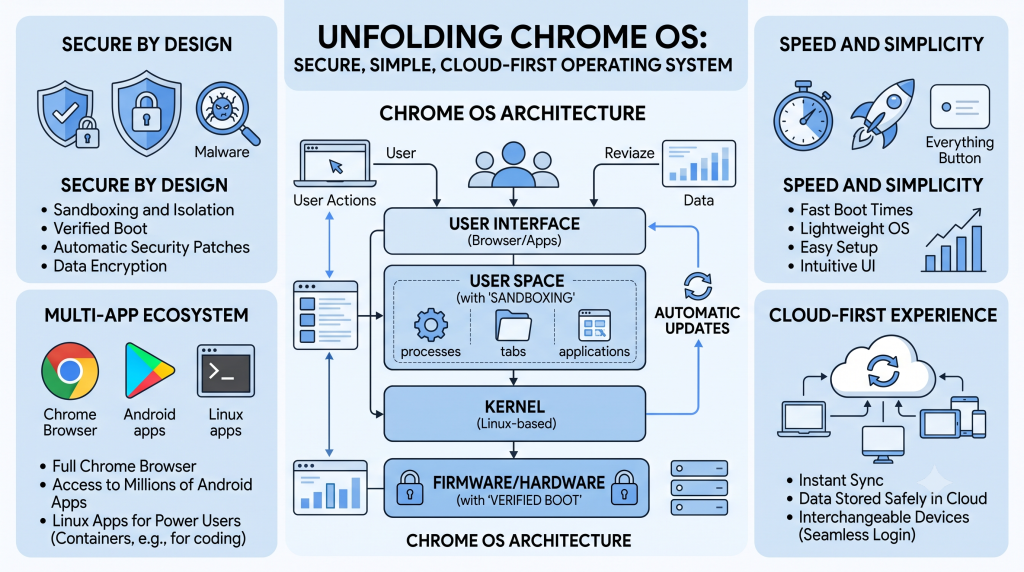
At its core, ChromeOS is a lightweight, cloud-centric operating system developed by Google. It is designed to provide a fast, simple, and secure way to interact with the web without the bloat of traditional operating systems.
While it centers around the Google Chrome browser interface, ChromeOS has evolved significantly. Modern ChromeOS devices can run:
- Web Applications: Progressive Web Apps (PWAs) and standard browser-based tools.
- Android Apps: Native mobile applications via the Google Play Store.
- Linux Applications: Desktop-class tools (like VS Code, GIMP, or LibreOffice) inside isolated Linux containers.
All underlying system operations—such as process management, memory allocation, and input/output (I/O)—happen seamlessly behind the scenes.
2. Key Features and Advantages
ChromeOS offers several unique operational benefits for both everyday users and organizational IT departments:
Zero-Setup & Pre-Installed System
ChromeOS devices (Chromebooks, Chromeboxes) come with the operating system pre-installed. Users do not need to perform complex installations or driver setups to get started.
Cloud Synchronization & Interchangeable Hardware
Logging into a ChromeOS device instantly signs you into your Google Account. Extensions, browser settings, and cloud-stored data pull directly from Google servers. Because data stays in the cloud rather than on local drives, hardware becomes interchangeable—if a device breaks, a user can log into a new Chromebook and resume work immediately.
Restricted System Access & Meddle-Proof Design
End users do not have administrative (root) rights on standard ChromeOS installations. This prevents accidental configuration changes, unauthorized software installations, or system instability.
Automatic Updates with Built-in Fail-Safes
ChromeOS updates seamlessly in the background. It utilizes an A/B system partition scheme: updates install on a secondary partition, and upon reboot, the system switches to the fresh OS. If an update encounters an error, the system automatically rolls back to the working partition, minimizing downtime.
3. ChromeOS Security Principles
ChromeOS was designed from the ground up to defend against modern security threats:
- Sandboxing: Every application and browser tab runs in an isolated environment. If a malicious site infects one tab, it cannot escape to corrupt the rest of the OS.
- Verified Boot: Every time a ChromeOS device starts up, it runs a self-check called Verified Boot. If it detects system modifications or malware, it automatically repairs itself using a clean system image.
- Data Encryption & Multi-User Privacy: All local user data is encrypted by default using account-specific keys. Multiple users can share a single Chromebook without risking data exposure.
- Physical Theft Protection: Encrypted drive storage ensures that even if a machine is stolen or lost, local data remains unreadable without user credentials.
4. ChromeOS in the Workplace & IT Support
For IT Support Specialists, ChromeOS presents an extraordinarily low-maintenance endpoint solution. Because the operating system is locked down, self-healing, and cloud-dependent:
- Troubleshooting is minimal: System errors and driver issues are rare compared to traditional OS environments.
- Provisioning is fast: Deploying a new machine takes minutes—users simply log in with their corporate Google accounts.
- Management is centralized: IT administrators can manage thousands of ChromeOS devices remotely via the Google Admin Console.
ChromeOS simplifies computing by abstracting system complexity away from the end user, offering a fast, cloud-integrated experience protected by multi-layered security.