Customer service is just as vital to an IT career as technical expertise. Fixing computers and configuring networks solves only half the equation; the other half is understanding and supporting the people using that technology.
While some technical problems lack a clean resolution, applying strong customer service techniques transforms stressful outages into productive, trust-building interactions.
The 4 Core Pillars of Exceptional IT Support
Great technical support relies on four foundational habits:
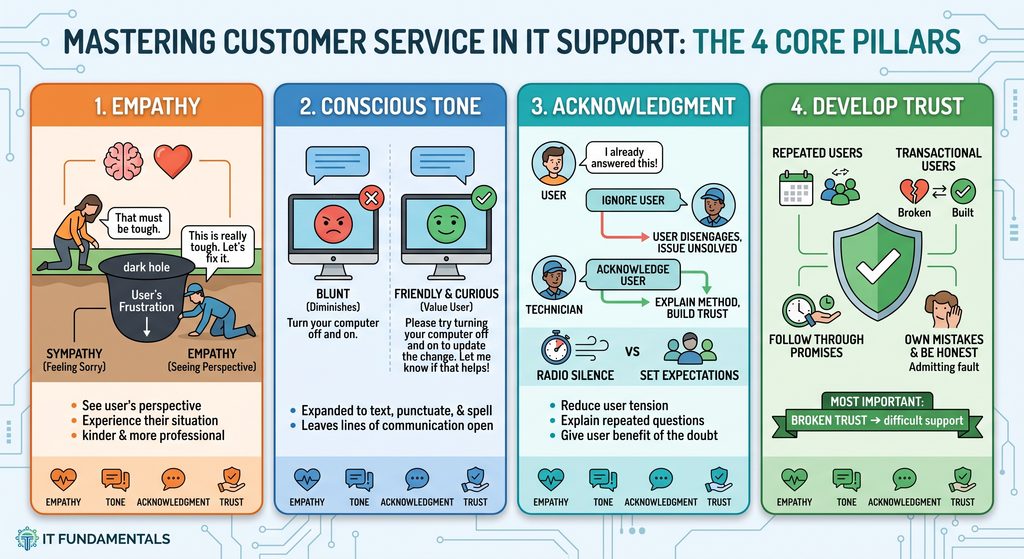
[ Empathy ] ────────▶ [ Conscious Tone ]
│ │
▼ ▼
[ Acknowledgment ] ─────▶ [ Building Trust ]
1. Empathy vs. Sympathy
Empathy forms the foundation of every positive interaction. While sympathy means feeling sorry for someone from a distance, empathy means stepping into their shoes and understanding their perspective.
- Sympathy: Looking into a difficult situation from the outside and offering detached pity.
- Empathy: Mentally stepping into the user’s frustrating scenario, recognizing the operational pressure they feel, and working beside them to resolve it.
- The Real Test: Displaying empathy is easy when a shift starts smoothly. Maintaining that empathy at the end of a demanding day—or when dealing with an upset user is what defines a true professional.
2. Being Conscious of Your Tone
In modern IT environments, most support interactions happen over chat, email, or ticketing systems rather than face-to-face. Tone is no longer just how you sound it is how you write, format, and frame your replies.
- Blunt and Closed:
“Restart your computer and it will work.”
(This sounds dismissive and cuts off communication.)
- Helpful and Collaborative:
“Please try restarting your machine. This will apply the configuration update we just pushed. If you run into any issues after the reboot, let me know and we will investigate further.”
(This explains the reason, provides clear direction, and leaves the door open for follow-up.)
3. Acknowledgment: Eliminate the Silence
When troubleshooting, avoid two common pitfalls: ignoring frustrated side remarks and going completely silent while doing research.
- Acknowledge Frustration: If a user expresses annoyance about repeating steps, explain why you are asking:
“I apologize for repeating these questions. I want to verify these details so we find the permanent root cause and prevent this from interrupting your work again.”
- Set Expectations for Pauses: Never leave a user hanging in silence on a call or in a chat thread. Provide a time estimate:
“I need to run a quick query in our logs. Would you mind holding for about three minutes while I check those records?”
4. Developing and Protecting Trust
Trust is the single most important factor when guiding users through technical issues. Without it, users may bypass instructions or avoid reaching out until systems fail completely.
- Follow Through on Commitments: If you promise an update within 30 minutes, deliver it on time. If you miss a deadline, acknowledge the delay immediately and apologize.
- Prioritize Transparency: Never invent explanations to sound authoritative in the moment. Be honest about what you know and what you are investigating.
- Own Mistakes: Admitting an oversight quickly and professionally strengthens credibility far more than deflecting blame.
Quick Implementation Checklist
- Adopt the user’s perspective before framing a solution.
- Audit your written tone for clarity, courtesy, and collaboration.
- Communicate your diagnostic steps to eliminate awkward dead air.
- Give users the benefit of the doubt most frustration stems from workflow disruption, not personal malice.