The terms “program,” “software,” and “application” are often used interchangeably to describe the digital tools that make modern computing possible.
Software comes in distinct layers to serve specific purposes:
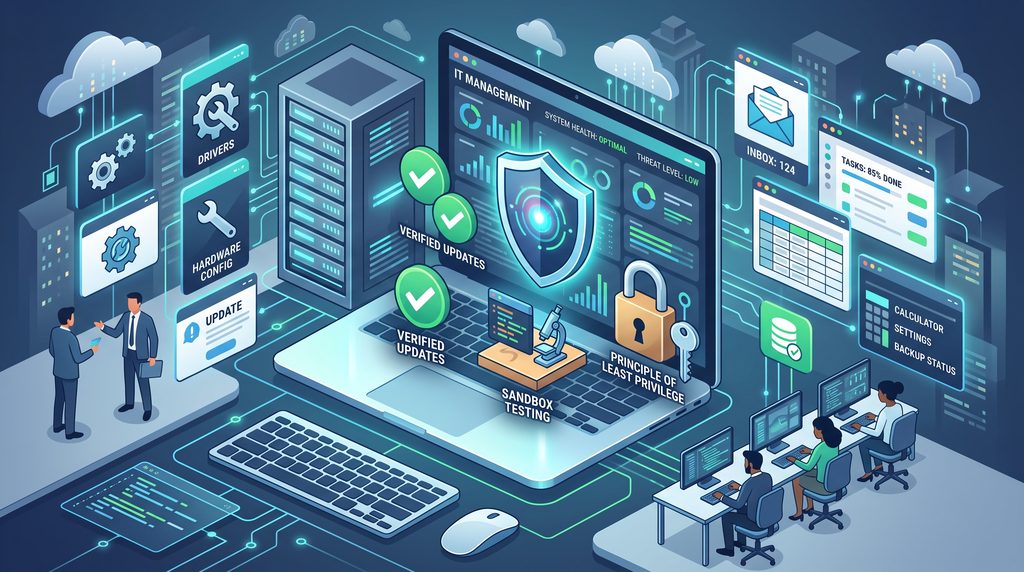
- System Drivers: Low-level software enabling the operating system to communicate directly with hardware.
- Productivity Applications: Core tools (spreadsheets, CRM platforms, email clients) employees rely on daily.
- System Utilities: Built-in helper tools (calculators, control panels, disk cleanup) designed for system configuration and maintenance.
Managing this software ecosystem across an organization requires a careful balance between rapid updates, operational stability, and cybersecurity.
The Risk of the “Blind Update”: Why Testing Matters
Software environments are never static. Vendors constantly ship patches, redesign interfaces, and introduce new features. While updates are essential, unvetted releases introduce operational friction.
A vendor pushing an untested update to your core payroll or ERP software can inadvertently overwrite internal configurations or break system compatibility entirely.
Best Practice: Never deploy major software updates straight into a live production environment. Always stage and test updates in an isolated sandbox to verify compatibility before rolling them out company-wide.
The Danger of Legacy Code: Why Outdated Software Fails
Ignoring software updates exposes systems to serious security liabilities. Software bugs flaws or errors in the code are prime targets for threat actors seeking unauthorized access.
Vendor updates serve critical defensive functions:
- Security Patching: Closing zero-day vulnerabilities and known software exploits before attackers can leverage them.
- Stability Fixes: Resolving memory leaks, background crashes, and operational glitches.
- Ecosystem Compatibility: Ensuring interoperability with modern operating systems and third-party APIs.
Maintaining a regular patching schedule prevents legacy applications from becoming an easy entry point for malware.
Effective Software Governance: Controlling the Endpoint
Software management is not just about what is installed; it is equally about what is restricted. When provisioning a workstation for a new employee, IT teams must ensure the user has everything required for their role while eliminating extraneous or high-risk software.
Organizations enforce strict software hygiene using these core rules:
- Source Verification: Only download and deploy installers directly from verified, reputable vendors.
- Principle of Least Privilege (PoLP): Restrict local administrative privileges. Standard end-users should not have permission to install unapproved software.
- Application Whitelisting: Prevent shadow IT and malicious executables by requiring administrative approval for any new software installation.
Establishing clear, consistent protocols for installing, patching, and removing software protects enterprise infrastructure while keeping teams productive.