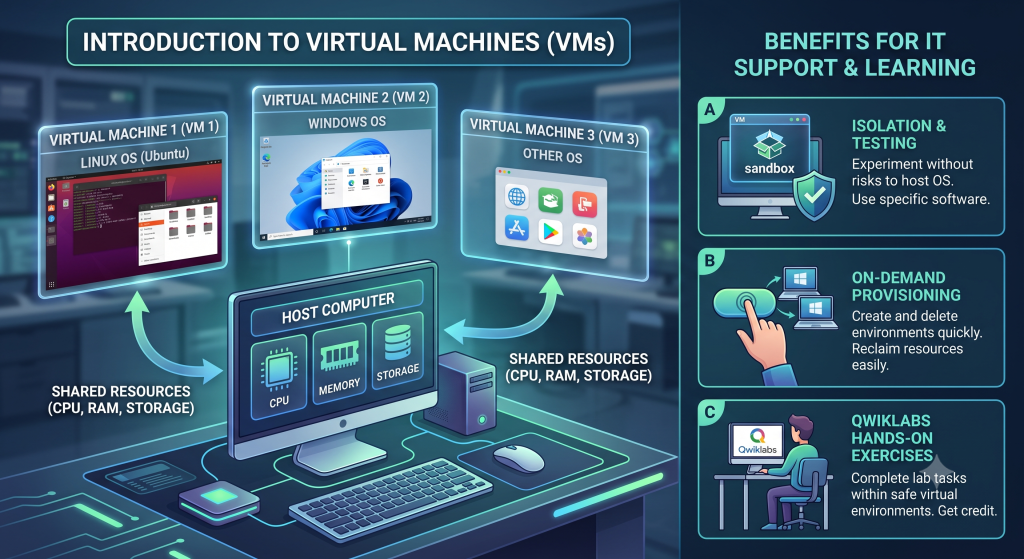
Before diving into operating system installation, it is essential to understand Virtual Machines (VMs). A virtual machine is essentially a software-based copy of a physical computer that runs inside your primary system.
Why Use Virtual Machines?
In IT support, you will often need access to an operating system or environment without having a dedicated physical machine in front of you.
- Run Multiple OSs Simultaneously: For example, if you run Windows but want to learn Linux, you don’t need to buy a second computer or dual-boot your hard drive. Using hypervisor software like VirtualBox, you can run Linux in an isolated window directly on your Windows desktop.
- Isolated Environment: Actions inside the VM do not affect your host computer’s primary operating system.
- Resource Efficiency: VMs share physical hardware resources (CPU, RAM, and Storage) from the host machine, but they can be created on-demand and deleted instantly when no longer needed to free up resources.
- OS-Specific Software Testing: If a task requires software available only on a specific operating system, you can quickly spin up a VM, complete the work, and remove the VM afterward.
Benefits for IT Departments
Virtual machines have become a standard tool in modern IT environments because they are:
- Easy to Provision: Create new virtual environments on demand in minutes.
- Easy to Maintain & Reclaim: Quickly delete or reset environments without hardware overhead.
- Scalable: Deploy testing, development, or support environments without purchasing new physical hardware.