When you open a browser, enter a web address, and land on your favorite page within milliseconds, a coordinated system of coding, naming, and translation happens behind the scenes.
Here is a breakdown of how web pages are built, named, and translated across the internet.
1. What Is a Web Page Made Of?
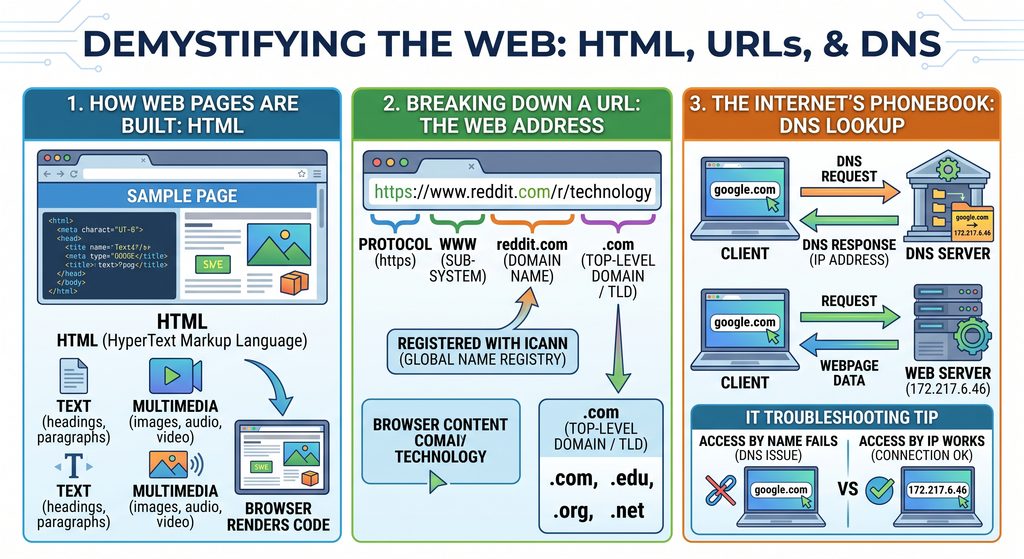
At their core, web pages are text files structured with HTML (HyperText Markup Language).
HTML is the foundational language that web browsers (like Chrome, Firefox, and Safari) read and render. It arranges text and integrates multimedia elements, including:
- Text and headings
- Images and graphics
- Audio files
- Embedded videos
2. Breaking Down a URL
When you type an address into your browser bar, you are entering a URL (Uniform Resource Locator)—the digital equivalent of a street address.
Taking [www.reddit.com](https://www.reddit.com) as an example:
www: Stands for the World Wide Web, indicating the sub-system being accessed.reddit.com(Domain Name): The unique, human-readable name of the website. Domain names are registered with and managed by ICANN (Internet Corporation for Assigned Names and Numbers). Once registered, no one else can claim that exact name unless the registration expires..com(Top-Level Domain / TLD): Standardized endings that often signal the website’s intended category:.com– Commercial entities.edu– Educational institutions.org– Organizations.net– Network infrastructure/services
3. The Internet’s Phonebook: Domain Name System (DNS)
Computers communicate using numerical IP addresses (such as 172.217.6.46), not words.
If you type 172.217.6.46 directly into your browser’s address bar and hit enter, you will be taken directly to Google’s homepage. Because humans remember words more easily than strings of numbers, the internet relies on DNS (Domain Name System).
- How DNS Works: Whenever you enter a domain name like
google.com, your computer automatically runs a DNS lookup. The DNS server looks up the domain name in its directory, finds the corresponding IP address, and directs your browser to that specific server.
4. Why DNS and IP Addresses Matter for IT Troubleshooting
Understanding the relationship between domain names and IP addresses is a fundamental IT troubleshooting skill:
- Diagnosing DNS Outages: If a user can access a website by typing its IP address (
172.217.6.46) but cannot reach it by typing its name (google.com), the network connection itself is working—the issue lies in the local DNS configuration or server. - Log Analysis: Server and security logs track client requests by IP addresses, making them critical for identifying traffic sources, auditing access, and investigating security events.