Few things are more frustrating than solving a complex, multi-step technical issue, only to encounter the exact same problem three months later and realize you have completely forgotten how you fixed it.
In IT support, documentation often feels like extra overhead in the moment, but it is one of the most powerful time-savers in system administration.
1. Centralizing Work: Ticketing and Issue Tracking
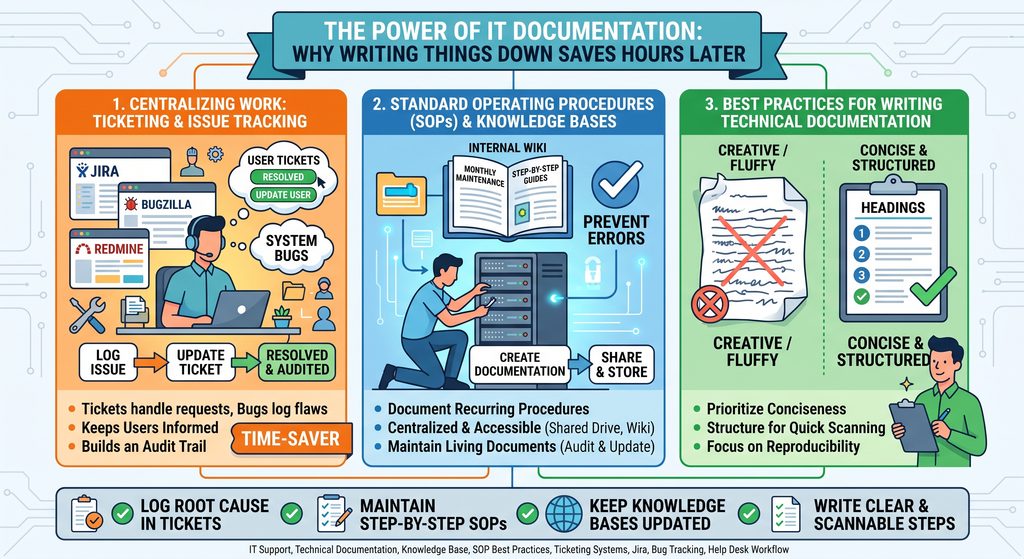
Relying on direct emails or chat messages to handle technical failures is unorganized and impossible to scale. Modern IT teams rely on centralized ticketing and issue-tracking platforms such as Jira, Bugzilla, and Redmine to manage both external user requests and internal system bugs.
- Bugs vs. User Tickets: User tickets handle operational requests and external user issues, while bug trackers log internal system flaws and code defects.
- Keep Users Informed: Updating tickets in real time maintains transparency and sets clear expectations with end users.
- Build an Audit Trail: Logging diagnostic steps, command outputs, and the final solution creates an auditable record that any team member can reference during future incidents.
2. Standard Operating Procedures (SOPs) and Knowledge Bases
Routine maintenance such as monthly server patching, system deployments, or legacy database updates should never rely on human memory alone.
- Document Recurring Procedures: Write step-by-step guides for any task performed periodically to eliminate guesswork and prevent configuration errors.
- Make It Centralized and Accessible: Store documentation in shared internal wikis, web knowledge bases, or shared drive repositories so the entire team can access it without bottlenecks.
- Maintain Living Documents: Documentation is never “set it and forget it.” As system architectures, dependencies, and policies evolve, procedures must be audited and updated to prevent outdated guides from causing downtime.
3. Best Practices for Writing Technical Documentation
Technical writing serves a functional purpose, not a literary one.
- Prioritize Conciseness: Write direct, plain instructions. Avoid unnecessary filler words or conversational fluff.
- Structure for Quick Scanning: Use numbered lists for sequential commands, bullet points for prerequisites, and callout blocks for critical warnings.
- Focus on Reproducibility: Ensure that any junior technician or peer can read the document and execute the exact steps successfully without needing additional explanation.
Summary Checklist for Effective IT Documentation
- Log root cause analyses and final fixes directly inside tickets before closing them.
- Maintain clear, step-by-step SOPs for all recurring tasks.
- Keep internal knowledge bases updated when system configurations change.
- Write clear, concise, and easily scannable procedural steps.