Building solid diagnostic skills is essential for any IT professional, but knowing what not to do is just as critical. When support requests pile up, even experienced technicians can fall into bad habits that lead to misdiagnoses, wasted time, and recurring tickets.
Two major troubleshooting pitfalls frequently derail support workflows:
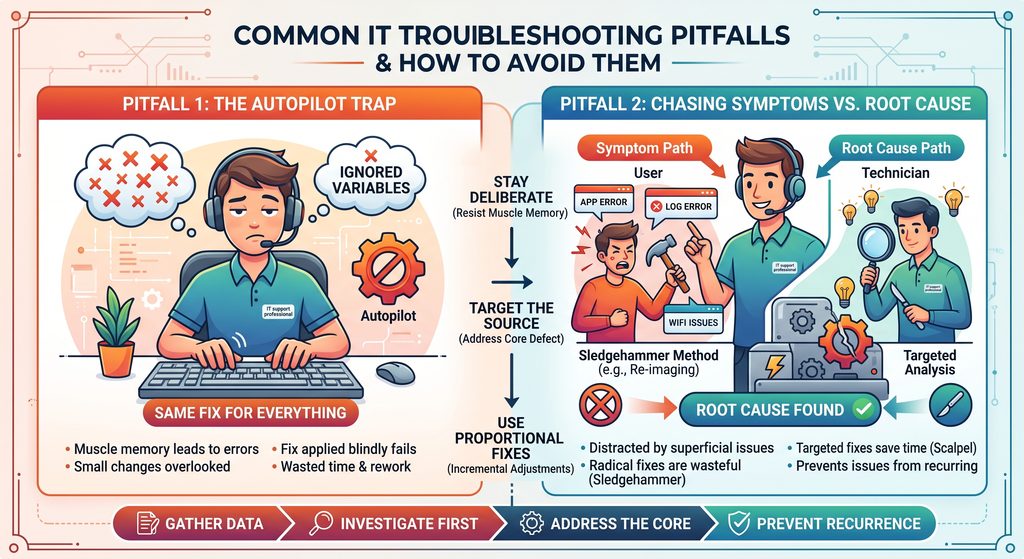
Pitfall 1: Switching to Autopilot
When you handle similar support tickets day in and day out, it becomes tempting to rely purely on muscle memory.
- The Risk: Assuming a ticket is identical to one you resolved ten minutes ago causes you to overlook tiny, critical variables. A fix applied blindly on autopilot often fails, forcing you to start over and undo sloppy work.
- The Fix: Treat every ticket as unique. Always pause to ask targeted questions, gather current data, and verify the specific symptoms before applying a solution.
Pitfall 2: Treating Symptoms Instead of Finding the Root Cause
When a workstation throws multiple errors or runs sluggishly, technicians often get distracted plugging small leaks rather than addressing the main pipe burst.
- The Sledgehammer Approach: It can be tempting to use nuclear options like wiping an entire machine and reinstalling the OS just to make a stubborn issue disappear quickly. Using a sledgehammer where a scalpel is needed fails to address why the failure occurred in the first place.
- The Scalpel Approach: If a user cannot reach an internal portal, re-imaging the laptop is an extreme, wasteful response. Methodically checking DNS resolution, proxy settings, or local host files isolates the actual defect.
- The Long-Term Benefit: Finding and fixing the underlying root cause prevents the issue from recurring across the entire organization, deepens your technical knowledge, and saves hours of collective troubleshooting effort.
Key Diagnostic Rules to Remember
- Stay deliberate: Resist muscle memory; verify assumptions before acting.
- Target the source: Address the core defect rather than chasing superficial secondary errors.
- Use proportional fixes: Apply incremental, precise adjustments instead of drastic system resets.