You’ve asked the right questions, isolated the problem domain, and followed the log “cookie crumbs” down to a manageable scope. Now comes the execution stage: remediation.
In technology, complex issues rarely have a single, obvious fix. Finding the root cause requires testing potential solutions systematically. If a step fails, you rule it out and move forward. But when multiple potential fixes are available, where should you begin?
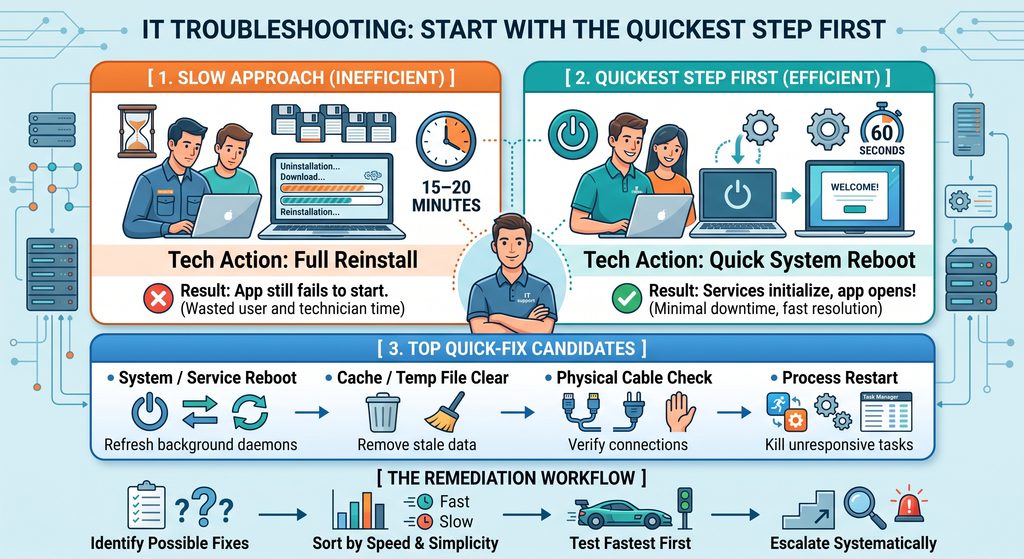
The answer is simple: Start with the quickest step first.
Efficiency Drives Support
When dealing with system malfunctions, two different actions might realistically solve the problem. Choosing which one to execute first comes down to time efficiency.
Consider how prioritizing quick actions changes the resolution workflow:
Scenario A: Starting with the Slowest Option
User: “I just installed this new software, but when I click the icon, nothing happens.”
Technician: “The installer might have corrupted a binary. Let’s run a complete uninstall, redownload the package, and reinstall it.”
(Result: 15 minutes later, the issue persists.)
Scenario B: Prioritizing the Quick Option
User: “I just installed this new software, but when I click the icon, nothing happens.”
Technician: “Did you perform a quick reboot after finishing the installation process?”
User: “Let me try that… and it opens immediately!”
(Result: Solved in 60 seconds.)
Both a software reinstallation and a system reboot were valid possibilities to address uninitialized background services or missing registry hooks. Because a reboot takes significantly less time to test, testing it first saves everyone time.
How to Apply the Rule in Daily IT Operations
- Value Everyone’s Time: Long remediation tasks keep users away from their work and tie up support capacity. Testing fast fixes minimizes downtime.
- Low Risk, High Reward: Prioritize actions that are non-destructive, fast, and simple to test (e.g., verifying network cables, checking service statuses, clearing caches, or restarting background daemons).
- Work Systematically: If the quickest fix fails, rule it out immediately and progress toward the more time-intensive diagnostic steps.
Troubleshooting is not just about solving the puzzle it is about reaching the resolution efficiently and effectively.