Computers don’t connect directly to each other through a tangled web of endless cables. Instead, modern networks rely on specific transmission mediums and dedicated hardware to route traffic smoothly.
1. How Devices Connect: Cables, Airwaves, and Light
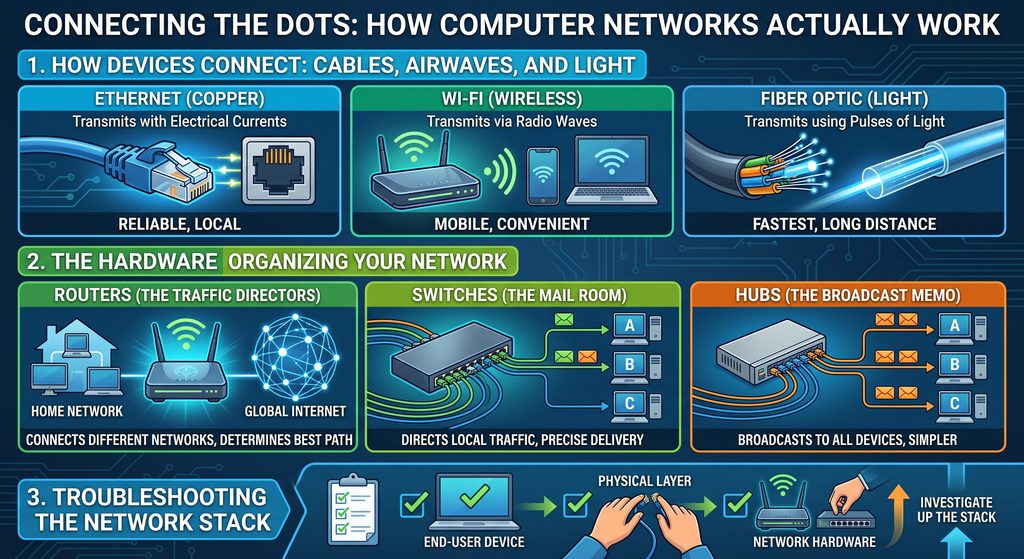
To join a network, a device needs a communication channel. The three most common connection methods are:
- Ethernet Cables (Copper): A physical cable plugged directly into a computer’s network port (RJ45). It transmits data via electrical currents over copper wires.
- Wi-Fi (Wireless): Built-in radios and antennas communicate over radio waves, allowing mobile phones, laptops, and smart TVs to connect without physical cords.
- Fiber Optic Cables (Light): High-speed cables containing thin glass fibers. Instead of electrical current, they transmit ones and zeros using pulses of light, offering the highest speeds over long distances.
2. The Hardware Organizing Your Network
Once a device connects, specialized hardware directs the flow of data:
- Routers (The Traffic Directors): Connect different networks together (such as your home network and your ISP’s network). When you send data outside your local network, routers use network protocols to find the fastest path to the destination.
- Switches (The Mail Room): Direct traffic inside a single local network. Just like an office mail room delivers letters directly to the right desk, a switch sends data specifically to the intended device.
- Hubs (The Broadcast Memo): Older, simpler networking hardware. Instead of routing data to a specific device, a hub broadcasts incoming packets to every connected machine simultaneously.
3. Troubleshooting the Network Stack
In IT support, resolving network issues means investigating the network stack—the entire set of hardware and software providing communication infrastructure.
When users report connectivity problems, standard troubleshooting moves through the stack step-by-step:
- End-User Device: Confirm the computer’s network settings, drivers, and adapters are functional.
- Physical Layer: Inspect physical cables, Wi-Fi antennas, and ports for damage or loose connections.
- Network Hardware: Check local switches, hubs, and routers to confirm traffic is routing correctly to the ISP and beyond.