When most people think of the Internet, they picture an invisible cloud that effortlessly streams videos, powers online shopping, and delivers an endless supply of cat memes. But there is no digital magic at play. The Internet is simply a massive, physical interconnection of computers spanning the globe.
In IT, we call any group of connected computers a network. Whether it is two laptops sharing files at home, hundreds of workstations linked across an office, or millions of enterprise networks tied together worldwide, the underlying mechanics remain the same.
The Internet vs. The World Wide Web
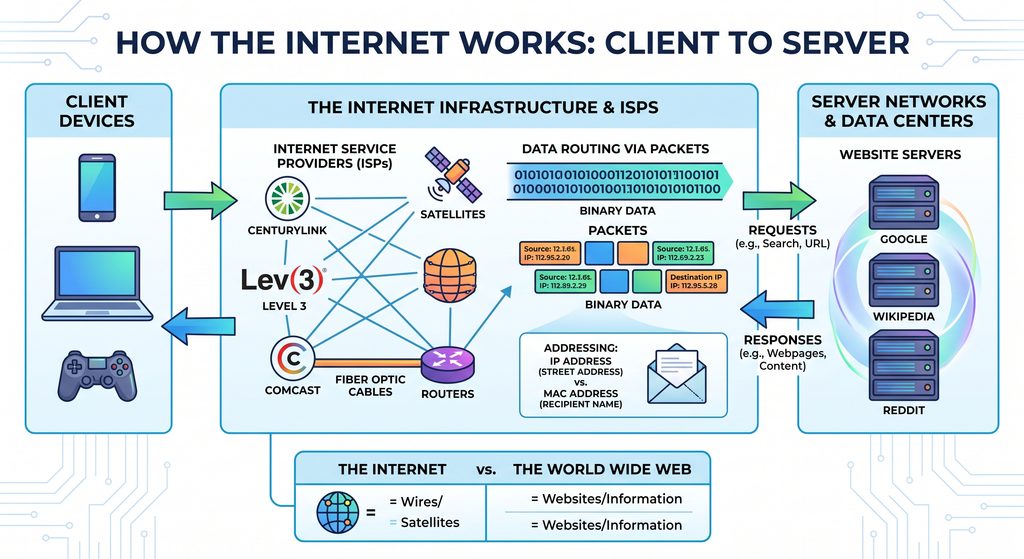
It is easy to use these terms interchangeably, but they are fundamentally different:
- The Internet: The physical infrastructure—undersea cables, satellites, cellular towers, and routers—that physically links billions of machines.
- The World Wide Web (WWW): The collection of digital information, websites, and pages that travel across that infrastructure.
Web browsers like Chrome, Edge, and Firefox are just one way to access the Internet. Dedicated applications like email clients, messaging tools, and file-sharing software interact with the Internet without relying strictly on the web.
Clients, Servers, and ISPs
Devices do not connect to the Internet in a chaotic free-for-all. Communication follows a structured hierarchy:
- Clients: Everyday devices like phones, laptops, and gaming consoles that request data.
- Servers: High-powered computers stored in data centers that store and serve data (such as Google, Wikipedia, or Reddit).
- Internet Service Providers (ISPs): Companies like Comcast, Spectrum, or CenturyLink that maintain regional cabling infrastructure. Your client device connects to your ISP, which in turn routes traffic to other ISPs and major server networks worldwide.
How Data Finds Its Destination: IP vs. MAC Addresses
Every piece of hardware on a network relies on two core identifiers:
- IP Address (Logical): Formatted like
172.217.6.46, this acts like a street address. It indicates where a device is currently located on the network hierarchy and can change depending on your connection. - MAC Address (Physical): Formatted like
82:4F:23:59:47:4A, this acts like the name of the recipient. It is permanently burned into your device’s network hardware.
The Letter Analogy: An IP address routes the envelope to the right building; the MAC address ensures it gets handed to the right person inside.
Routing and Packets
Whenever you load a webpage, the data does not travel as one massive file. It is sliced into microscopic chunks of binary data (ones and zeros) called packets.
- Request: When you search for something online, your computer bundles the request into small packets stamped with your IP/MAC address (sender) and the destination server’s IP address (receiver).
- Hops: Your local router sends the packet to your ISP. If the ISP doesn’t directly host the destination, it forwards the packet to the next major routing hub, moving step-by-step across the globe.
- Delivery: Once the packets arrive at the server, the server processes the request and sends the requested data packets back along a similar path.
- Reassembly: Your browser receives the scattered packets, puts them back in order, and displays the final webpage on your screen.